Archive for May, 2010

Pylons and Facebook Application Layout

Sunday, May 30th, 2010

While I spent quite a bit of time deciphering the Graph API documentation and the OAuth guides that Facebook puts forth and submitted three documentation fixes for examples that call non-existent parameters and consequently don’t work, I came to the realization that my original layout really only works if you use a single Pylons instance per Facebook application. Since we’re focused on Don’t Repeat Yourself (DRY) Principles, some thought needs to go into things.

First, our platform needs to be designed. For this set of projects we’re going to use Nginx with uwsgi. Since we’re serving static content, we’re going to set up our directories on Nginx to allow that content to be served outside our Pylons virtual environment. Tony Landis was one of the first to provide an implementation guide for uwsgi with Nginx for Pylons which provided some of the information needed to get things working.

Our theoretical layout looks like the following:

/webroot
  |--- /static
  |--- /fb
/virtualenv
  |--- /fbappone
  |--- /fbapptwo

Later we’ll add a CDN that does origin pulls from /webroot/static. This application would have worked wonderfully with Varnish and ESI if the ESI could be compressed, but, setting up Nginx -> Varnish -> Nginx -> uwsgi seemed somewhat inefficient just to add compression. The Facebook application we’ve developed is an IFrame canvas which took roughly fifteen hours to debug after the original concept was decided. The majority of that time was spent dealing with the IFrame canvas issues. FBML was much easier to get working properly.

What we end up with is a url structure like:

http://basedomain.com/
     /static/ (xd_receiver.html, jquery support modules, CSS files)
     /fb/ (Generic facebook files, support, tos, help)
     /(fbapp)/application_one/
     /(fbapp)/application_two/

As a result of this structure, we don’t need to manipulate config/routing.py as the default’s set by Pylons map things the way we want. In the /static/ directory, we can put our CSS, js and static media files. Remember to minify the CSS and js files and combine them if possible.

Our nginx config looks like:

server {
    listen   1.2.3.4:80;
    server_name  xxxxxx.com;
    access_log /var/log/nginx/xxxxxx.com-access.log;

    location ~* (css|js|png|jpe?g|gif|ico|swf|flv)$ {
        expires max;
    }

    gzip on;
    gzip_min_length 500;
    gzip_types text/plain application/xml text/html text/javascript;
    gzip_disable "MSIE [1-6]\.";

    location ^~ /static/ {
    	alias   /var/www/xxxxxx.com/static/;
    }
    location ^~ /fb/ {
    	alias   /var/www/xxxxxx.com/fb/;
    }
    location / {
        uwsgi_pass  unix:/tmp/uwsgi.sock;
        include     uwsgi_params;
    }
}

We could modify the nginx config to pull / from the static page, but, we’re actually capturing that with a root controller that knows what applications reside below it as a directory of sorts.

We used Debian which doesn’t support uwsgi yet. A brief set of instructions follows which should work on any Debian based distribution as well:

apt-get install libxml2-dev dpkg-dev debhelper
cd /usr/src
apt-get source nginx
wget http://projects.unbit.it/downloads/uwsgi-0.9.4.4.tar.gz
tar xzf uwsgi-0.9.4.4.tar.gz
cd nginx
vi debian/rules
  add:  --add-module=/usr/src/uwsgi-0.9.4.4/nginx/ \
dpkg-buildpackage
dpkg -i ../nginx_0.7.65-5_i386.deb
mkdir /usr/local/nginx/
cp /usr/src/uwsgi-0.9.4.4/nginx/uwsgi_params /etc/nginx

/etc/nginx/uwsgi_params, add:

uwsgi_param  SCRIPT_NAME        /;

Note: I had problems with 0.9.5.1 and paster enabled wsgi applications which caused issues with Pylons.

Our uwsgi command line for development:

/usr/src/uwsgi-0.9.4.4/uwsgi -s /tmp/uwsgi.sock -C -iH /var/www/facebook/ --paste config:/var/www/facebook/fpapp/development.ini

One of the things that made Facebook integration difficult was somewhat incomplete documentation or even incorrect documentation on Facebook’s site. While the Graph API is new, it is quite a bit more powerful. While they do have official support, I think I’ll use velruse for OAuth integration next time and use the Python-SDK for the Graph API integration. See my previous post on using Pylons for a Facebook Application for a little more detailed information on how to get the application working.

Netflix, king of the popunder, declines me as an advertiser

Friday, May 28th, 2010

A newspaper site is allowed to do a popunder ad that captures any click on the page. Social media sites are littered with Netflix ads, yet, a Facebook application that brings in a reasonably decent demographic, is declined. At first I thought the problem was the fact that their signup form asks for three pieces of information then submits the application to connectcommerce (Google Affiliate Network) which fills in all of the fields with N/A. Once I attached my Google Adsense/Adwords account, and filled in the proper contact information, I resubmitted my request and received the following:

Dear xxxxxx, Inc., 

Thank you for your interest in working with Netflix. Unfortunately your request to join the Netflix affiliate program was not accepted by the advertiser. 

This action is not necessarily a reflection of the quality, value or traffic of your Web site. Your application may have been declined because it's not a good match for Netflix. 

We apologize for any inconvenience and encourage you to apply for other Google Affiliate Network advertiser programs that may be a better fit. Click here to apply for additional Google Affiliate Network advertiser programs today:

The time from application to decline was 38 minutes. The application did not receive any type of review based on a quick scan of the logs. A dismissal without even viewing the site – even though a sample URL was requested.

Oh well, plenty more advertisers to choose from.

Using Pylons for a Facebook Application

Thursday, May 27th, 2010

Cue Inspiration

I had an idea the other day for a simple Facebook application. With Pylons, I figured it would take no more than an hour or two to get the mechanics of the application working at which point a designer could come in to handle the rest. What followed was quite a struggle.

I’ve written Facebook applications using the old PHP SDK. While this method is rather well documented, moving to Python should have been easy. PyFacebook, a project hosted at GitHub, is woefully out of date. Even after applying three of the suggested patches, and modifying one of the imports in the library, I was left with numerous issues regarding the access_token, odd redirects and a few other minor issues. Add to this the fact that Facebook really suggests that applications use the Graph API and IFrames rather than the FBML canvas and we’re setting ourselves up for a problem down the road. Facebook has maintained that they will always support FBML and the REST API, but, new features won’t be accessible to the older API.

With that in mind, I looked at Python SDK, the officially recommended library for Python and Facebook. While Pylons is supported fairly well, going through the documentation on Facebook’s site resulted in looking through the PHP-SDK, the supplied oauth access in the Python-SDK and a bit of trial and error along the way. OAuth with the Graph API is a bit more complex to understand, but, if your application is using AJAX or JSON, avoiding the FBML proxy is much quicker. Flash was used quite a bit with FBML applications so that applications could communicate directly with a game server which made things much quicker. HTML apps using FBML often exhibited pageload performance problems. With the IFrame method, your application still runs within Facebook’s canvas, but, the surfer is communicating directly with your application.

What happened?

First, I tried to replicate what I had done in PHP using PyFacebook and Pylons. While there are hooks for WSGI (which includes Paster/Pylons implemented servers), there were a number of issues. I briefly tried Django with PyFacebook and met different issues. Once you stray from PHP, you’re in uncharted territory. A statistic I read somewhere claimed that only a few hundred apps were developed in something other than PHP with Java/JSP being the most common alternate. Django, the Google App Engine and web.py appear to be the favorites among Python frameworks. While I know there are a handful of applications running Pylons, and at least one running TurboGears, I don’t believe there are many using the Graph API.

At this point, the Graph API and OAuth seemed to be the sane choice. An IFrame canvas, using the Javascript SDK to complement Python SDK appeared to be the answer.

The first stumbling block when following the OAuth guide on Facebook is the frame in a frame shaded authentication box. Clicking on the grey box opens the inner frame to the full page where you can authorize the application, but, that is a rather ugly situation. The following Javascript fixes that which isn’t great solution, but does work.

<script language="javascript">
top.location.href='https://graph.facebook.com/oauth/authorize?client_id=${config['facebook.appid']}&redirect_uri=${config['facebook.callbackurl']}&display=page&scope=publish_stream';
</script>

Error validating verification code

After working with a few other issues, another issue with the auth_token resulted in the following error (after loading the url that was being fetched):

{
   "error": {
      "type": "OAuthException",
      "message": "Error validating verification code."
   }
}

Adding &type=client_cred to your access_token url fixes that situation.

Here’s the guide

We’re going to put our project in the facebook directory and use Pylons 1.0:

git clone http://github.com/facebook/python-sdk.git
wget http://www.pylonshq.com/download/1.0/go-pylons.py
python go-pylons.py facebook
cd facebook
source bin/activate
paster create -t pylons fbapp
cd fbapp
vi development.ini
rm fbapp/public/index.html
cp ../python-sdk/src/facebook.py fbapp/fbapp/lib

We need to make a few changes to our development.ini in the [app:main] section:

facebook.callbackurl = http://apps.facebook.com/ourfbapp/
facebook.apikey = 6b5aca8bd71c1234590e697f79xxxxxx
facebook.secret = df5d928b87c0df312c8be101e5xxxxxx
facebook.appid = 124322020xxxxxx

modify config/routing.py:

    map.connect('/{action}', controller='root')
    map.connect('/', controller='root', action='index')

templates/oauth_redirect.mako:

<script language="javascript">
top.location.href='https://graph.facebook.com/oauth/authorize?client_id=${config['facebook.appid']}&redirect_uri=${config['facebook.callbackurl']}&display=page&scope=publish_stream';
</script>
<noscript>
<a href="https://graph.facebook.com/oauth/authorize?client_id=${config['facebook.appid']}&redirect_uri=${config['facebook.callbackurl']}&display=page&scope=publish_stream" target="_top">Click here to authorize this application</a>
</noscript>

templates/index.mako:

${tmpl_context.user}

controllers/root.py:

# using python 2.5
import simplejson
import cgi
import urllib

from pylons import request, response, session, tmpl_context, config
from pylons.controllers.util import abort, redirect

from fbapp.lib.base import BaseController, render
import fbapp.lib.facebook as facebook

class RootController(BaseController):

    def __before__(self):
        tmpl_context.user = None
        if request.params.has_key('session'):
            access_token = simplejson.loads(request.params['session'])['access_token']
            graph = facebook.GraphAPI(access_token)
            tmpl_context.user = graph.get_object("me")

    def index(self):
        if not tmpl_context.user:
            return render('/oauth_redirect.mako')
        return render('/index.mako')

In Facebook, you want to make the following changes:

Canvas Callback URL: http://yourdomain.com/
Connect URL: http://yourdomain.com/
Canvas URL: http://apps.facebook.com/yourappname/
FBML/Iframe: iframe
Application Type: website

Under the Migrations Tab, Verify that New Data Permissions and New SDKs are both set to enabled. When you write your application, you can refer to the extended permissions which are set in the &scope= section of oauth_redirect.mako.

What’s next?

Once you’ve retrieved the access_token and the user_id, you probably want to save that into your local database so that you don’t need to fetch the data from the Graph API on every pageload. While the Graph method is indeed faster than FBML, Facebook has lifted some of the restrictions regarding the data you can keep which allows for faster pageloads. With the IFrame method, pages using AJAX/JSON are indeed much quicker.

While I originally estimated this project to take ‘a few hours’, working through all of the possible scenarios with the Python Facebook SDK ended up taking quite a bit more time than expected. The Graph API is very well thought out and is much faster than the REST API and appears to be almost as fast as FQL.

Good Luck!

Google Voice Call Log Time Warp

Monday, May 24th, 2010

While I have been using Google Voice more regularly, I haven’t made the switch to using it as my primary number. It is a little odd to place a call from the web, have my office phone ring, then hear the ring on the other side, but, having my numbers in one place, a call log and many other useful features is quite handy. While I’ve only ever given out one phone number for the last ten years, I’ve maintained that with creative use of busy call forwarding, ultra call forwarding and a number of other calling features over the years. While it works, Google Voice does handle things a little better.

However, on a recent call, it appears that I made a call that was 13 minutes long, 12 minutes ago. Google knew when my call would end.

While there are quite a few odd things about Google Voice, I am getting closer to using it for my permanent number.

Nginx to Apache?

Sunday, May 23rd, 2010

A few months ago we had a client that wanted to run Nginx/FastCGI rather than Apache because it was known to be faster. While we’ve had extensive experience performance tuning various webserver combinations, the workload proposed would really have been better served with Apache. While we inherited this problem from another hosting company — he moved because they couldn’t fix the performance issues — he maintained that Nginx/FastCGI for PHP was the fastest because of all of the benchmarks that had been run on the internet.

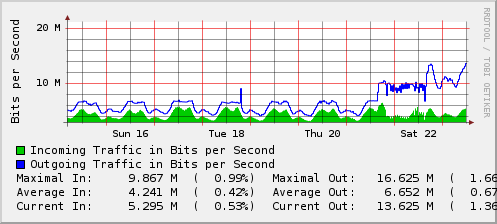
While the conversion to or from one server to another is usually painful, much of the pain can be avoided by running Apache on an alternate port, testing, then, swapping the configuration around. The graph below shows when we changed from Nginx to Apache:

We made the conversion from Nginx to Apache on Friday. Once we made the conversion, there were issues with the machine which was running an older kernel. After reviewing the workload, we migrated from 2.6.31.1 with the Anticipatory Scheduler to 2.6.34 with the Deadline Scheduler. Three other machines had been running 2.6.33.1 with the CFQ scheduler and showed no issues at the 10mb/sec mark, but, we felt that we might benchmark his workload using deadline. We’ve run a number of high-end webservers with both Anticipatory and CFQ prior to 2.6.33 and for most of our workloads, Anticipatory seemed to win. With 2.6.33, Anticipatory was removed, leaving NOOP, CFQ and Deadline. While we have a few MySQL servers running Deadline, this is probably the first heavy-use webserver that we’ve moved from CFQ/AS to Deadline.

The dips in the daily graph were during times where a cron job was running. The two final dips were during the kernel installation.

All in all, the conversion went well. The machine never really appeared to be slow, but, it is obvious that it is now handling more traffic. The load averages are roughly the same as they were before. CPU utilization is roughly the same, but, more importantly, Disk I/O is about half what it was and System now hovers around 3-4%. During the hourly cron job, the machine is not having issues like it was before.

Nginx isn’t always the best solution. In this case, 100% of the traffic is serving an 8k-21k php script to each visitor. Static content is served from another machine running Nginx.

While I do like Nginx, it is always best to use the right tool for the job. In this case, Apache happened to be the right tool.

Entries (RSS) and Comments (RSS).
Cluster host: li